
Tech Neck: Exercises to Undo Desk-Bound Neck Pain
The ache at the base of your skull after a day at the screen isn't just tightness to stretch away — it's a posture your body has learned. Here's what's actually happening and the daily reset that retrains it.
7 min read · Updated July 2026

What tech neck actually is
"Tech neck" is the stiffness, aching, and upper-back tension that builds up from hours with your head tipped toward a screen. The name is casual; the mechanics are real. Your head weighs roughly 10–12 pounds when it's balanced over your shoulders — but the further it drifts forward, the more load the muscles at the back of your neck have to hold against gravity. Tip it toward a laptop for eight hours and those muscles never get to switch off.
Two things happen over time:
- The upper trapezius and levator scapulae — the muscles running from your neck to the top of your shoulder blade — stay switched on all day, get tight, and start to ache.
- The deep neck flexors at the front, the small muscles meant to hold your head stacked and level, get lazy and stop doing their job. Your head drifts further forward, and the cycle tightens.
That's why the fix has two halves — release what's overworked, and wake up what's gone quiet. Stretching alone only does the first.
Why stretching alone won't fix it
Rubbing and stretching a tight upper trap feels great — for about an hour. Then you go back to the screen, your head drifts forward again, and the same muscles re-load. If stretching were the whole answer, one good session would hold. It doesn't, because the reason those muscles are tight is a head position your body has defaulted to.
The reset that actually holds pairs two things:
- Chin tucks to retrain the deep neck flexors — gliding the head straight back over the shoulders to rebuild the strength that keeps it there without effort. This is the piece almost everyone skips, and it's the one with the most evidence behind it.
- Targeted stretches for the upper trap, levator scapulae, and upper back to release the tissue that's been holding tension, so the retraining isn't fighting a locked-up neck.
Do both, daily, and you stop treating the symptom every evening and start changing the pattern that causes it.
The daily reset
RepDriver's free Desk Neck Reset is one short session — about 12–15 minutes — built to be done every day. It follows the evidence-led order: gently mobilize, reset the forward-head position, then release the specific muscles a desk overloads, and finish calm.
| Phase | What you do | Why |
|---|---|---|
| Mobilize | Cat-cow, neck & shoulder rolls | Warm the spine and neck so nothing's cold when you stretch |
| Reset | Chin tucks | Retrain the deep neck flexors — the strengthening half most routines skip |
| Release | Ear-to-shoulder, levator stretch, thread the needle, eagle arms | Directly target the overworked upper traps, levator, and upper back |
| Calm | Seated neck release, a gentle twist, rest | Down-regulate and let the neck settle |
Follow it in the app
Desk Neck Reset — the daily 12-minute flow
Voice-guided, seated-friendly, with calm music. Do it once a day for four weeks. Try it free in your browser — no signup.
Try any day free — no signupThe moves that matter
A handful of these you can do right now, in your chair. Tap any move to see it demonstrated with step-by-step voice guidance.
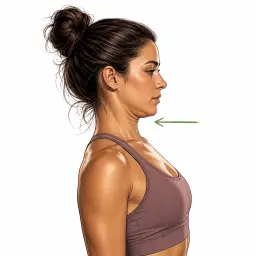
Chin Tuck
Glide the head straight back over the shoulders — a soft double chin. The single most important move here.

Ear-to-Shoulder Stretch
Anchor one shoulder down, tip the opposite ear toward its shoulder. Releases the upper trap.

Levator Scapulae Stretch
Turn 45° away and drop the chin toward the armpit — targets where the neck meets the shoulder blade.
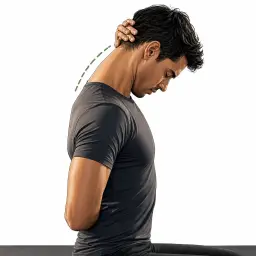
Seated Neck Release
Let the chin drop toward the chest, lengthening the back of the neck. Just the weight of the hands.
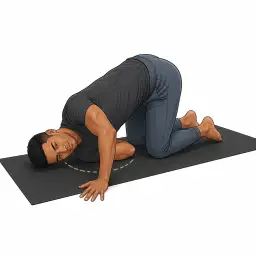
Thread the Needle
A floor pose that opens the upper back and rear shoulder — the deeper part of the reset.
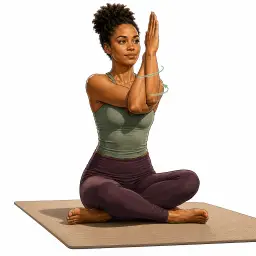
Seated Eagle Arms
Wrap the arms and lift the elbows to spread and stretch between the shoulder blades.
Desk habits that matter
The routine resets the pattern; your desk setup decides how hard you're fighting it the rest of the day. A few changes remove most of the load:
- Raise the screen. The top of your monitor should be at roughly eye level so you look slightly down, not crane forward. A laptop almost always needs a stand plus an external keyboard.
- Bring the screen closer. Leaning in to read small text is a hidden driver of forward-head posture — increase font size and sit back.
- Break the static hold. The problem isn't any one position, it's holding one for hours. Stand, look away, and do two or three chin tucks every 30–45 minutes.
- Watch the phone. Looking down at a phone is tech neck in miniature — lift it toward eye level instead of dropping your head to it.
Common questions
- Do chin tucks actually work for tech neck?
- Yes — chin tucks are one of the few neck exercises with real research support. They activate the deep neck flexors (the small muscles that hold your head stacked over your shoulders) which switch off when you crane forward at a screen. Strengthening them is what lets a better head position hold on its own, rather than something you have to consciously force.
- How long until desk neck pain improves?
- Many people feel looser and less achy within the first few sessions because the stretches immediately release the overworked upper traps. Retraining the posture — so you're not fighting the same tension every afternoon — takes a few weeks of daily consistency. It's a habit, not a one-time fix.
- Can I do these neck stretches at my desk?
- Most of them, yes. Chin tucks, the ear-to-shoulder and levator stretches, and the seated neck release are all done seated and need no mat — you can run through them in your chair between meetings. The full guided routine adds a couple of floor poses (thread the needle, a twist) for a deeper reset when you have space.
- Can you reverse forward head posture?
- You can substantially improve it. 'Forward head posture' is largely a pattern of tight, overworked muscles at the back of the neck and weak, switched-off deep flexors at the front — both trainable. Bone-level changes aren't reversible, but for the vast majority of desk workers the posture is a muscular habit that responds well to daily stretching plus chin-tuck strengthening.
- Should neck stretching ever hurt?
- No. Neck tissue is sensitive — these stretches should feel like a gentle, satisfying lengthening, never a sharp pull. Use only the light weight of your own hand, never crank your head with force. Sharp pain, or any tingling, numbness, or pain that shoots down an arm, means stop and see a professional — that's beyond what a mobility routine should address.
- How often should I do neck stretches for tech neck?
- Daily is ideal for a pattern you reinforce all day at a desk — little and often beats one long weekly session. The Desk Neck Reset routine is built to be done once a day; even a few chin tucks and side stretches between tasks help on top of that.
Sources & further reading
The claims in this guide are backed by peer-reviewed research and public-health and professional bodies. Follow any link to read the primary source.
- 1.A neutral head weighs 10–12 lb, and the load on the neck rises steeply as it tilts forward — Surgical Technology International (2014)
- 2.Deep cervical flexor (chin-tuck) training improves head posture and eases chronic neck pain — BMC Musculoskeletal Disorders (2018), systematic review
- 3.Therapeutic exercise measurably reduces forward head posture — J. Manipulative & Physiological Therapeutics (2018), meta-analysis
- 4.Sustained low-level upper-trapezius activity at a screen is linked to neck pain — Peer-reviewed study · PubMed Central (NIH)
- 5.Arm pain, numbness, or tingling can signal a pinched cervical nerve — Cleveland Clinic
- 6.Position the top of your monitor at or slightly below eye level — U.S. OSHA — Computer Workstations eTool
Put it on your real calendar.
Create a free account to schedule the routine, follow along with voice guidance and music, and log every session — or just browse the library first.
Create a free account